
TikTok Ads Integration

We are thrilled to announce the release of the TikTok Ads Integration with eduCRM. This new integration improves our product’s functionality by providing users with automatic lead syncing and nurturing from TikTok Ads Instant Forms to eduCRM contacts.
Streamlining College Enrollment Campaigns with AI Technology

In the competitive field of college admissions, where effective communication and maintaining a consistent brand image are critical, enrollment professionals are always looking for more efficient ways to reach prospective students. The eduCRM AI Campaign Builder introduces a practical solution that simplifies the process of creating personalized email campaigns.
Enhance your Sender Reputation with List-Unsubscribe Header
A new feature, the List-Unsubscribe Header, has been introduced into the eduCRM platform to enhance your institution’s sender repurtation and deliverability. This feature inserts a small portion of code into every eduCRM email. Gmail has the most advanced implementation of the List-Unsubscribe header. If you have a strong reputation with Gmail and your email contains the List-Unsubscribe header, Gmail will prompt a pop-up box asking the user if they’d rather unsubscribe instead of reporting the email as spam. Despite potentially elevating your unsubscribe rate, this header’s benefits far outweigh the drawbacks. It helps maintain your email sender reputation, promotes engagement with your best-fit students, and reduces the risk of your email being classified as spam. While it’s not necessary to manually incorporate the List-Unsubscribe header in your emails (eduCRM takes care of that!), we consistently support our clients in adopting the best deliverability practices for recruitment communications, including: Targeting only engaged prospective students. Customizing content according to a user’s interests. Using real identities, not faceless institutional entities, as the sender. Incorporating varied information using conditional content. Predicting optimal send times for better engagement. Testing clean email designs for effectiveness. Need help? Kickstart your optimized recruitment communications with our Conversation Planning service – turnkey planning, designing, and managing your recruitment communications. Learn more …
Connected Email with eduCRM
With eduCRM, send emails to students across tools, sync your messages, and gain valuable insight into the recruiting process. With our email sync feature, your connected email account “syncs” emails across devices whether you are following up from your mobile device, using a desktop application, such as Outlook, or via a web browser. Email Sync with eduCRM View all interactions with a student—emails you’ve sent or received—in a unified location, allowing staff members to “pick up” the conversation with prospective students. Avoid overlooking crucial emails as you toggle between different work tools. Monitor your recruitment process effectively, as all account users can observe communications via the activity stream. Select your preferred communication method with contacts, using either eduCRM or your campus email. Monitor when your emails are opened and track when links within them are clicked. Set up automatic responses for when a student engages with your email, such as opening it or clicking a link. Gain Valuable Insight with Sentiment Analysis With our “sentiment analysis” feature, you can determine whether an incoming student email is positive, negative, or neutral. Built-in machine learning determines email tone, allowing you to understand the impact of your interactions with prospective students quickly. eduCRM can trigger an alert or follow-up automation if a student’s sentiment changes. Connect your campus email account today and transform how you follow up with students, keeping all of your messages in one convenient place.
Maximize Email Engagement with eduCRM’s Predictive Sending Feature
How can your institution ensure that your email campaigns consistently land with relevance, engagement, and personalization in your student’s inbox? Enter – predictive email sending.
Conditional Content Feature Now Available in the Email Designer
Conditional Content Feature Now Available in the Email Designer Ensuring your students see the most relevant message content leads to higher engagement, enrollment conversion, and yield. At its basic level, the conditional content feature allows you to create one email in multiple versions. Create and send unique Content to different student audiences given their enrollment stage, demographic data, interests, and behavior using a single email. Add an extra level of personalization to display images, offers, or Content based on pre-set conditions. For instance, you could: Display a school or college image depending on a contact’s academic interest Insert a different offer depending on the student’s enrollment stage Change your email’s sender signature based on academic-, student activity-, or athletic-interests Apply “conditions” on the container, structure, or section level and choose to select conditions based on your existing tags. For more information, contact our support team.
Announcing transactional email within automations
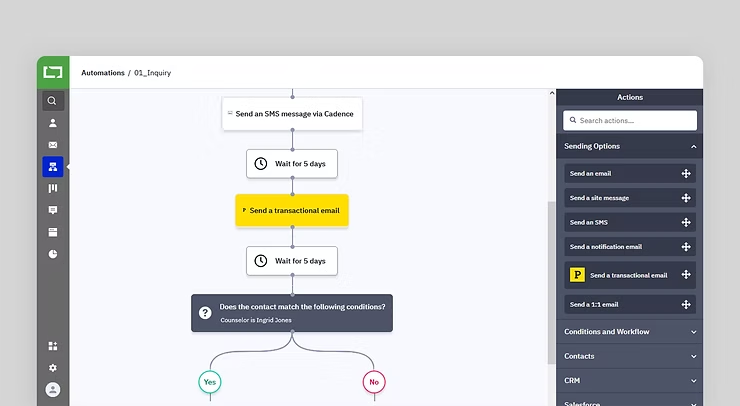
With eduCRM, you can send marketing or transactional emails, triggering emails from a recruitment automation.
New Streamlined and Intuitive Navigation | eduCRM
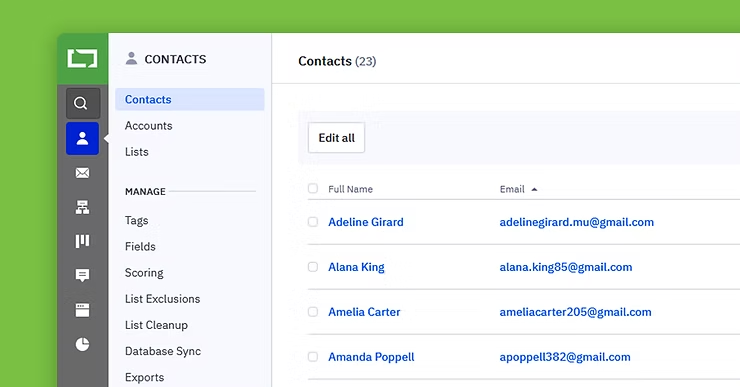
May 2022 Our optimized, streamlined navigation experience in the platform make it: Quicker to navigate around the platform Easier to find related features, settings, and reports Simpler to complete core tasks You’ll also be able to complete many of your most-used tasks in fewer clicks, including: Creating and managing contact lists Configuring and updating feature-specific settings Reviewing and exporting feature-specific reports And more! What’s new? New features grouping We want to make sure your experience is as intuitive as possible. Based on customer feedback, we’re grouping relevant features together such as Lists under the Contact sub-navigation and Tasks under the Deals sub-navigation. Access settings and reports right where you need them The improved left-hand navigation groups related settings and reports into key feature areas like Contacts, Deals, and Website without having to navigate into other areas of the platform. To view related settings and reports, click on any main feature on the navigation bar. Settings will be available under the Manage section, and relevant reports will be available under the Reports section. You can still access the general Settings and Reports pages from the main navigation. Easily collapse and expand the navigation. You can easily collapse the navigation if you need more space on the platform dashboard to complete tasks. To do this, click on the arrow at the top-right corner of the navigation. To expand the navigation bar, click on the same arrow again. Improved readability and accessibility You’ll also notice updated colors and icons, which improve readability and accessibility. For more information, contact our support team.
Logging your recruitment phone calls on the go
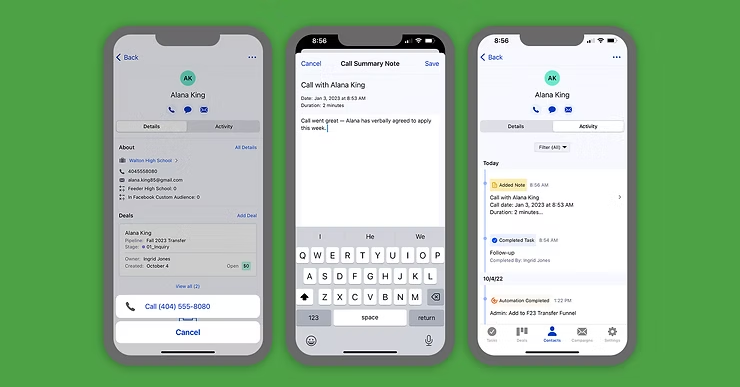
How effective could your recruiters be if they could access student data and make follow-up phone calls on the go? What would that increase in recruitment performance mean to your next entering class? Having a strong game is essential for any new student recruitment effort. High school visits, college fairs, and presentations take your recruitment team on the road and away from their desktops. Effective recruiters are following up by phone, but away from their desks, they face: No easy way to share essential details from the road Disorganized notes that take time to add to your contact records, if at all Details that may be forgotten by the time they’re able to log into your computer Incomplete info that contributes to a poor recruitment experience for your students Equip your recruiters on the go with the new call-logging feature for iOS and Android. Our new call-logging feature lets recruiters call a contact directly from the app and write a summary about the call afterward. How does it work? Select a contact from the mobile app Tap the phone icon under the name of who you want to call After the call is completed, a screen will appear with pre-populated information: The date Time of the call Estimated duration of the call A blank text box allows you to enter a summary of the call — topics discussed, follow-up questions, next steps, concerns, or anything else that will give helpful context. Once you save your summary, it will appear in the contact’s activity tab. A mobile CRM that keeps you connected to your most important data Our mobile app empowers recruiters with the CRM data they need on their phones. Recruiters can manage their entire recruitment pipeline on the go, assign follow-up tasks to the admissions back office, and access and update student and school information. At the same time, enrollment managers gain measurable insight into recruitment effectiveness.
Nurture Stronger Recruitment Relationships with Engagement Tracking for One-to-One Emails
As part of your recruitment automation strategy, automated, one-to-one emails help ensure that every insight is aligned. Your follow-up recruitment automations can deliver a connected recruitment experience, and recruiters can take the conversation to the next level for more engaged students — and yield more enrolled students.